

Introduction
Welcome to the Cherokee Nation Artists website. This how-to guide covers what you need to know as a Cherokee artist and the resources available to you.
About the Website
This site is the central online hub for the Cherokee art community. It provides news, information on upcoming classes, artist resources and support aimed at strengthening the community by preserving the skills, attributes and livelihoods that sustain Cherokee art and culture.
About the Artist Recovery Act
Established in 2022, the Cherokee Artist Recovery Act is a multimillion-dollar Cherokee Nation initiative originally created to support Cherokee artists affected by the COVID-19 pandemic. It offers economic relief and cultural investment through paid classes, market access funding, marketing assistance, facility improvements and direct art purchases. The program continues today to help sustain Cherokee creative work and traditions.
Account Assistance
Below is helpful information about your Cherokee Artist account and profile, including how to log in and what to do if you have forgotten your email or password. If you have not yet created a Cherokee Nation Artists account, submit an artist registration request. You will need to submit a request and be approved before accessing all online services and resources.
Log Into Your Account
- Click ‘Login‘ in the site navigation or the bottom below. You can only log in once your registration is approved.
- Sign in with your email and password. Here are some helpful tips to make it easy for future access.
- Clicking the eye icon in the password field allows your to preview your entry.
- Selecting the ‘Remember Me’ checkbox will save your login information for future visits.

Forgot Your Password?
- Go to the ‘Account Log In’ page.
- Click ‘Lost your password?’ under the password field.
- Enter the email associated with your account.
- Click ‘Get Reset Link.’
- Check your email and follow the reset instructions.

Forgot Your Account?
- Reach out to our team through our ‘Contact Us‘ form.
- Select ‘Account & Technical Assistance’ and include a message stating you no longer know the email associated with your account.
- We will reach back out to you within 1 to 3 business days with instructions on how to access your account.

Update Your Account
- Log into your account.
- Visit your ‘Account Settings’ to update your information.
- Update your information such as name, email, etc. in the appropriate fields.
- Click ‘Update’ to apply changes immediately.
Delete Your Account
Understand that deleting your account also deletes your artist profile.
- Reach out to our team through our ‘Contact Us‘ form.
- Select ‘Account & Technical Assistance’ and include a message stating you would like your account deleted.
- Please allow 1 to 3 business days to process your request.
Online Resources
Art Acquisitions
See Available Bids
- Go to cherokeebids.org.
- Browse all active bids.
- Click ‘View’ on any bid to read requirements.
Submit A Bid
- Go to cherokeebids.org.
- Select your intended bid.
- Follow the specific procurement instructions.
Artist Community Profile
Your Artist Community Profile is where Cherokee artists present their talent to the world. Your work helps Cherokee customs and culture thrive. We invite you to showcase your talents on our website.
Creating Your Artist Profile
- Submit an ‘Artist Registration‘ request (if you have not already). Once your registration is approved, you will have access to build your Artist Profile which will be featured in the ‘Artist Community‘.
- When you are ready to build your profile, log into your account.
- Visit the ‘Artist Profile Builder‘ found in your ‘Account Dashboard‘.
- Complete all required fields and review your information for accuracy.
- Click ‘Submit Artist Profile for Review’ to send your artist profile for approval.
- Your artist profile submission will enter pending status and be reviewed by our team. Expect an email notification about your artist profile status within 3 to 5 business days from the date you submitted your request.
- Once your artist profile is approved, it will automatically be added to the ‘Artist Community‘ page.
Uploading Your Artwork Gallery
1. Start by selecting ‘Add To Gallery’.
2. A window will open where you can upload images of your artwork from your device. You may upload photos individually or multiple at a time.
3. After you have uploaded your artwork, you may add the artwork title and a description by selecting the individual thumbnails.
4. Once you have added all of the artwork information, make sure to select all of the images you would like to be displayed in your gallery. The images that have been selected will display a checkbox in the top-right corner of the thumbnail. After all of your images are selected, click ‘Select’.
You will now see all of your selected images in the gallery field box.
5. Now that you have uploaded and selected all of the images you would like listed in your artist gallery, feel free to rearrange the order of the images by dragging the thumbnails around. You may also click the individual thumbnails to make any changes to the titles and description.
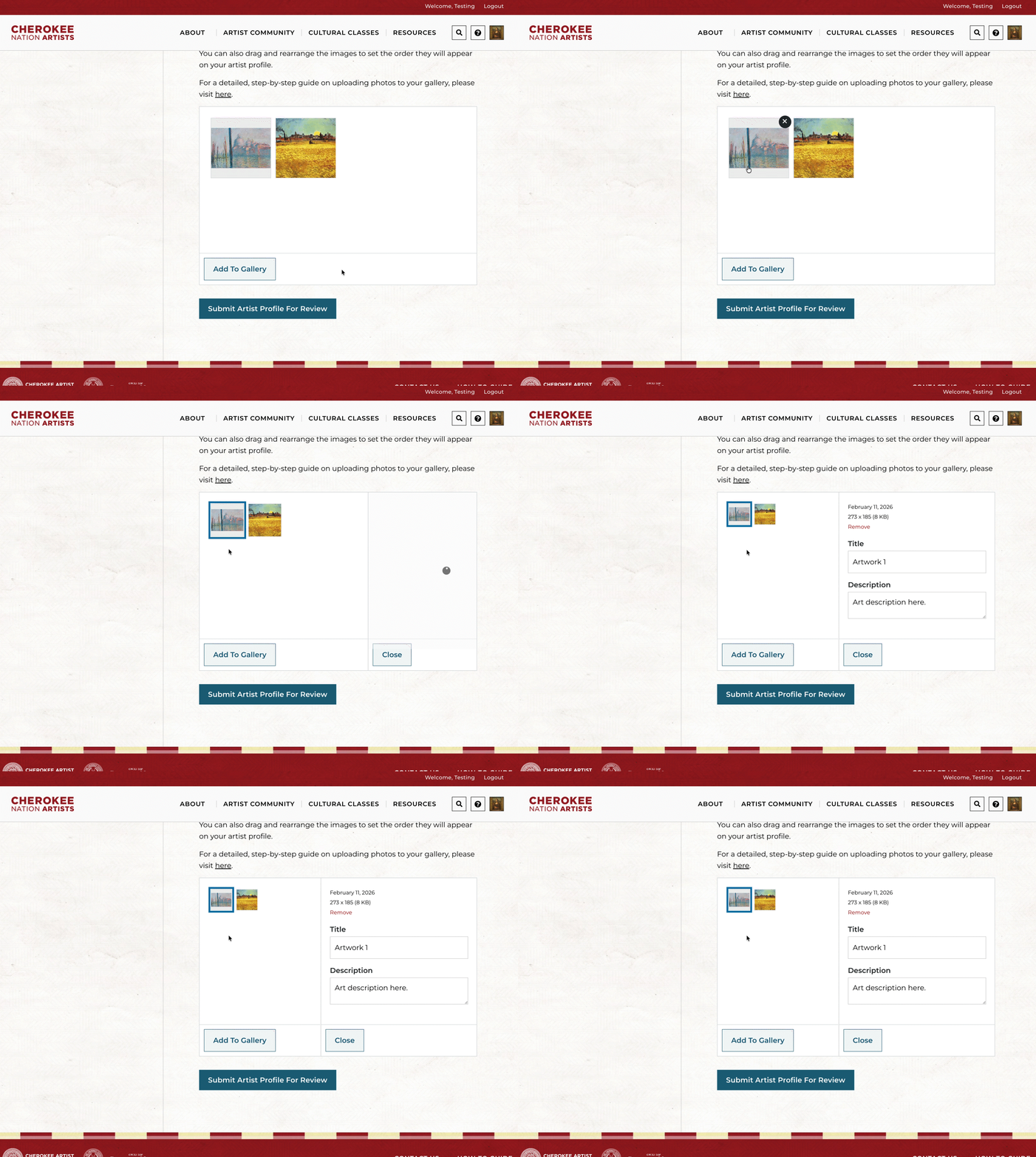
6. Once you have completed the full artist profile builder form and are satisfied with your artist gallery, click ‘Submit Artist Profile For Review’. This will submit your artist profile request to our team for review. We’ll send an email within 1 to 3 business days with your profile status.
Update Your Artist Profile
Details on how to update your artist profile are coming soon!
Share Your Artist Profile
Artist Community Profile
Your Artist Community Profile is where Cherokee artists present their talent to the world. Your work helps Cherokee customs and culture thrive. We invite you to showcase your talents on our website.
Creating Your Artist Profile
- Submit an ‘Artist Registration‘ request (if you have not already). Once your registration is approved, you will have access to build your Artist Profile which will be featured in the ‘Artist Community‘.
- When you are ready to build your profile, log into your account.
- Visit the ‘Artist Profile Builder‘ found in your ‘Account Dashboard‘.
- Complete all required fields and review your information for accuracy.
- Click ‘Submit Artist Profile for Review’ to send your artist profile for approval.
- Your artist profile submission will enter pending status and be reviewed by our team. Expect an email notification about your artist profile status within 3 to 5 business days from the date you submitted your request.
- Once your artist profile is approved, it will automatically be added to the ‘Artist Community‘ page.
Uploading Your Artwork Gallery
1. Start by selecting ‘Add To Gallery’.
2. A window will open where you can upload images of your artwork from your device. You may upload photos individually or multiple at a time.
3. After you have uploaded your artwork, you may add the artwork title and a description by selecting the individual thumbnails.
4. Once you have added all of the artwork information, make sure to select all of the images you would like to be displayed in your gallery. The images that have been selected will display a checkbox in the top-right corner of the thumbnail. After all of your images are selected, click ‘Select’.
You will now see all of your selected images in the gallery field box.
5. Now that you have uploaded and selected all of the images you would like listed in your artist gallery, feel free to rearrange the order of the images by dragging the thumbnails around. You may also click the individual thumbnails to make any changes to the titles and description.
6. Once you have completed the full artist profile builder form and are satisfied with your artist gallery, click ‘Submit Artist Profile For Review’. This will submit your artist profile request to our team for review. We’ll send an email within 1 to 3 business days with your profile status.
Update Your Artist Profile
Details on how to update your artist profile are coming soon!
Share Your Artist Profile
Market Access
Cherokee Nation citizen artists and performers are eligible for assistance with expenses related to preparing for and traveling to art shows, events and markets. To support these efforts, artists can apply for a reimbursement of up to $2,000 annually for eligible expenses related to registration, travel, advertising or supplies for qualified art markets or shows.
Application Process
Step 1: Application
- Option A: Apply Online
- Option B: Apply by Email or Postal Service
- Download the application form. The application must include the following:
- Market/show/exhibit name
- Event information
- Estimated travel expenses
- Acceptance letter or invitation
- Mail physical forms to:
Cherokee Nation Artist Recovery Act
3377 Cherokee Springs Road
Tahlequah, OK 74464
- Download the application form. The application must include the following:
Step 2: Committee Review
- The committee will review your application. If approved, you may proceed to the reimbursement process.
4. Recieve Your Materials
- After approving your final designs, allow up to 30 days for your printed materials to arrive.
Reimbursement Process
Step 1: Application
- Option A: Apply Online
- Option B: Apply by mail or email
- Download the application form. The application must include the following:
- Market/show/exhibit name
- Event information
- Estimated travel expenses
- Acceptance letter or invitation
- Mail physical forms to:
Cherokee Nation Artist Recovery Act
3377 Cherokee Springs Road
Tahlequah, OK 74464
- Download the application form. The application must include the following:
- The committee will review your application
- If approved, you may proceed to the reimbursement process
Step 1: Application
- Option A: Apply Online
- Option B: Apply by mail or email
- Download the application form. The application must include the following:
- Market/show/exhibit name
- Event information
- Estimated travel expenses
- Acceptance letter or invitation
- Mail physical forms to:
Cherokee Nation Artist Recovery Act
3377 Cherokee Springs Road
Tahlequah, OK 74464
- Download the application form. The application must include the following:
- The committee will review your application.
- If approved, you may proceed to the reimbursement process.
4. Recieve Your Materials
- After approving your final designs, allow up to 30 days for your printed materials to arrive.
Marketing Materials Request
Marketing Materials Assistance helps Cherokee Nation citizen artists with their business development efforts. Artists can apply for in-kind services for the printing and production of approved marketing materials up to a value of $500 annually.
Cherokee Nation Cultural Tourism will design three template options and allow the artist to customize selections based on marketing needs. Printing is available for business cards, brochures or booth signage up to a maximum annual value of $500.
Application Process
Step 1: Application
- Option A: Apply Online
- Use the online application link (embedded link)
- Complete all required fields, including selecting your preferred design templates
- Submit the form electronically
- Option B: Apply by Email or Postal Service
- Download the application form (embedded link)
- Complete all required sections of the form
- Select your preferred design templates
- Mail or email the completed form to:
Cherokee Nation Artist Recovery Act
3377 Cherokee Springs Road
Tahlequah, OK 74464
2. Application Review
- The Artist Recovery Act committee will review your submission
- You will be notified of your application status once the review is complete
3. Approval & Materials Review
- If approved, you will be emailed proofs are your requested marketing materials. Review the proofs or renderings provided for your marketing materials
- Approve the final designs so production can begin
4. Recieve Your Materials
- After approving your final designs, allow up to 30 days for your printed materials to arrive